

Accepting bank transfer payments online and matching orders
Founder, Lunixi
Accepting bank transfer payments online sounds like the simplest thing in payments. You show your account details, the customer pushes the money from their banking app, and you release the order once it lands. The part nobody budgets for is matching. A transfer with no reference, a payment that is £15 short because the customer forgot delivery, a payment from the customer's business account under a different name: each one means someone opening the bank statement next to the order list and working it out by hand.
This guide covers how account-to-account payments reach you in the UK and the euro area, why matching breaks, the rules that let you close most payments without touching them, and how request-to-pay and instant payment rules are changing the picture. It is written for merchants and the teams who build their checkout, not for banks.
How do bank transfer payments reach a merchant?
For the customer it is always "send money to this account". For you, the difference is which payment system carries it and how fast it arrives.
In the UK, most of these payments travel over Faster Payments. Pay.UK describes it as available day and night, 365 days per year, and it has been running since 2008 (Pay.UK, Faster Payment System). The scheme allows individual payments of up to £1 million, but the banks and payment firms offering the service set their own limits, which can be much lower than the scheme limit (Pay.UK, Transaction limits). A customer trying to pay a £12,000 invoice from a personal account may simply hit their bank's cap and have to split the payment or call their bank.
In the euro area, the equivalent is SEPA Instant Credit Transfer (SCT Inst). The Instant Payments Regulation, Regulation (EU) 2024/886, required euro-area PSPs to be able to receive instant transfers by 9 January 2025 and to send them by 9 October 2025; payment institutions and e-money institutions have until 9 April 2027. The payee's provider has to make the funds available within ten seconds, and an instant transfer cannot cost more than a standard one (Regulation (EU) 2024/886). Ordinary SEPA credit transfers still exist and follow banks' business-day processing.
| UK Faster Payments | SCT Inst | Standard SEPA transfer | |
|---|---|---|---|
| Availability | 24/7, 365 days | 24/7, every day | Business days |
| Speed | Typically near-instant | Within 10 seconds | Business-day cycle |
| Amount | Scheme £1m; banks lower | Bank limits; users can set their own | Bank limits |
| Payee check | Confirmation of Payee | Verification of Payee | Verification of Payee |
The practical point: on instant rails, "has the money arrived?" can be answered in seconds. That only helps you if your system notices the payment in seconds too. A bank statement downloaded once a day turns an instant payment back into a next-day one.
How does order matching work for bank transfers?
Manual matching usually looks at three things: amount, payer name and the reference field. If all three line up, the order is released. The trouble is that all three are in the customer's hands. They can leave the reference blank, mistype the order number, pay from a partner's account, or round the amount.
The way to remove most of that uncertainty is to give every order a short, unique payment reference and show it next to the account details and the exact amount. When a credit lands on your account, the system looks for the reference first, then checks the amount and the payment deadline. If the reference and amount match, the order is confirmed without anyone looking at it.
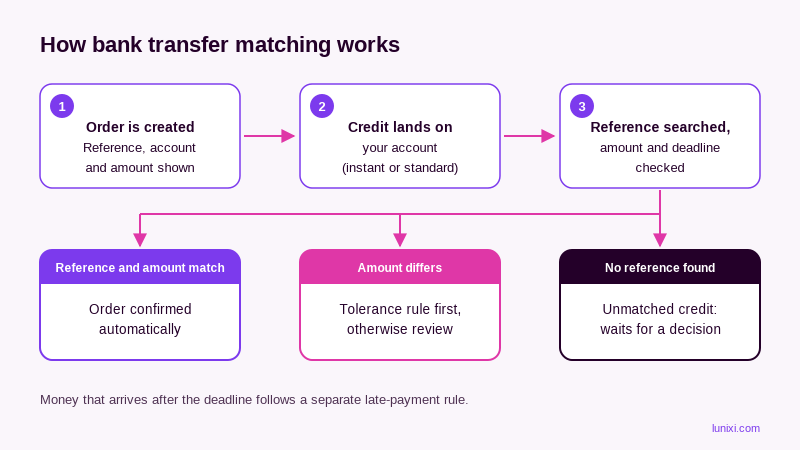
The format of the reference matters more than it looks. Long references get mistyped. An order number like "WEB-2026-000184523" has to be copied character by character into a banking app, often on a phone. Keep the reference to six to eight characters, leave out easily confused characters (0 and O, 1 and I), and add a check character so that a single typo produces "reference not found" instead of matching someone else's order.
The payee check helps from the other side. Confirmation of Payee is Pay.UK's account name-checking service, built to reduce misdirected payments (Pay.UK, Confirmation of Payee). In the euro area, Verification of Payee became mandatory for euro-area PSPs from 9 October 2025 and must be free (Regulation (EU) 2024/886). Make sure the account name you display is exactly the name on your account. A mismatch warning on the customer's screen can make them abandon the payment.
Six ways matching breaks
Take a furniture retailer selling online that collects 600 orders a month by bank transfer. Assume 12% of customers leave out the reference or get it wrong: that is 72 payments a month. If each one takes five minutes to find, check and chase, that is six hours a month on matching alone, and weekend payments wait until Monday. The 12% is an assumption for the example; a week of your own statement lines will give you the real figure.
Most breaks fall into one of these patterns:
- No reference or the wrong one. The field is blank, says "payment", or carries another order's reference.
- Short payment. The customer left out delivery or paid an old quote: £485 expected, £470 received.
- Excess payment. Paid twice, or rounded up.
- Split payment. Paid in two instalments, sometimes from two accounts, often because of a bank limit.
- Late payment. The deadline passed, the stock was released, then the money arrived.
- Paid by someone else. A partner, parent or the customer's company paid; the payer name does not match the order.
Without a rule for each of these, the credit lands in a "pending" list and waits for someone. The goal is not to automate every decision. It is to separate the payments that genuinely need a person from the ones that do not.
Which rules should you set for short, excess and late payments?
Start from the decisions your team already makes by hand. If customer service routinely accepts a payment that is up to £5 short, write that down as a rule. The table below is a typical starting set; adjust the thresholds to your basket size.
| Situation | Suggested rule | Who sees it |
|---|---|---|
| Reference and amount match | Confirm the order, notify the customer | Nobody |
| Reference matches, payer name differs | Confirm on the reference, note the name; review only high values | Customer service, high values only |
| Short by a small amount (e.g. up to £5) | Confirm, record the difference | Finance report |
| Short by a larger amount | Hold the order, ask for the balance | Customer service |
| Excess payment | Confirm, queue the excess for refund | Finance and refunds |
| Split payment | Wait for the balance, confirm when the total matches; refund if the deadline passes | Automatic, then customer service |
| No reference, amount matches a single pending order | Show as a suggestion; a person confirms | Customer service |
| Paid after the deadline | Reopen and confirm if in stock, otherwise refund; tell the customer | Customer service |
Two details are easy to miss. First, "the amount matches" is not a safe match on its own. If three pending orders share the same amount on the same day, you cannot tell which one was paid without the reference, so treat unreferenced matches as suggestions. Second, refunding an excess payment is itself a payment, and it should go out exactly once. Send refund requests with an idempotency key so a retry cannot pay the customer twice; our article on duplicate payments and idempotency covers the pattern.
Set a payment deadline and show it. Twenty-four hours suits a shop with stock on the shelf; made-to-order furniture might allow seventy-two. When the deadline passes, the order is cancelled, the stock is released and the customer is told why. If the money arrives afterwards, the late-payment rule takes over.
Setting up automatic matching in six steps
For a team building this from scratch, the order is usually:
- Get account activity continuously. A statement exported once a day wastes the speed of instant payments. Credits should reach your system as they happen, through your bank's account data services or a layer such as Bank Accounts.
- Give each order a reference and a deadline. Store them with the payment record and show them on the payment page and in the confirmation email.
- Fix the matching order. Reference first, then amount, then deadline. Use the payer name as supporting evidence only; family and business accounts make it unreliable as a key.
- Write the rules. Start from the table above, and define which state each rule moves the order into.
- Push events to your order system. When a payment is confirmed, send a signed notification so the warehouse starts work without anyone refreshing a dashboard. That is what webhooks are for.
- Reconcile at close of business. The sum of matched credits should equal the movement in your bank balance. If it does not, a credit was missed or matched to the wrong order. Our reconciliation page shows the card-side equivalent of this check.
It also helps to track each order's payment through a few clear stages: "awaiting payment", "partly paid", "paid", "expired". With clear states and transitions, a late payment becomes one transition rule rather than a scatter of special cases in the code. We describe this approach for card payments in our article on payment intent architecture, and the same logic carries over to transfers.
How do you protect yourself from fake payment screenshots and scams?
Every merchant taking transfers eventually gets the message: "I've paid, here's the screenshot, can you ship today?" The screenshot may be genuine, edited, or show a payment that was never completed. The rule is simple: release the order on the credit in your own account, never on a document the customer sends. Automatic matching enforces this for free, because the decision comes from the bank movement and the screenshot never enters the process.
The other risk is that the payment is part of a scam. In the UK, the Payment Systems Regulator's reimbursement protections for authorised push payment fraud apply to Faster Payments and CHAPS payments made on or after 7 October 2024, with a maximum claim of £85,000 (PSR, APP fraud reimbursement protections). Those rules sit between the victim and the payment firms, but a merchant whose account receives scam proceeds may still find the funds questioned and the account reviewed. A high-value order paid from an account with no connection to the buyer, with a request for urgent delivery, deserves a pause. Our guide to online payment fraud goes through these signals in detail.
What do request-to-pay and instant payment rules change?
The root of the matching problem is that the customer starts the payment: they copy the account details and type the reference. Request-to-pay services turn that around. In the typical set-up, the merchant sends a request carrying the amount and reference, and the customer approves or declines it in their banking app. Because the customer never types the reference, unreferenced payments largely disappear. Keep your short-payment rule anyway, since the customer still controls whether and when the payment is made.
Request-to-pay works best on instant rails, where you see the result in seconds. In the euro area, the European Payments Council's November 2025 status update put SCT Inst at 30.7% of all SEPA credit transfer volume in the third quarter of 2025, and notes that structured data in payments reduces errors in processing and reconciliation (EPC, Status update on SCT Inst, QR-code standardisation and VoP). Close to a third of euro credit transfers are already instant, which makes real-time matching more valuable each year.
Cards and bank transfers: which for which order
They do different jobs. Cards are easier for an individual customer who wants to pay and leave; transfers suit high-value, business and trade orders, and situations where a card limit gets in the way. If cards are your main channel, our guide to what a virtual POS is covers that side.
| Card payments (virtual POS) | Bank transfer | |
|---|---|---|
| Customer experience | Completed on the payment page | Customer switches to their banking app |
| High amounts | Limited by the card limit | Limited by bank transfer limits |
| Receiving funds | After the settlement period agreed with your acquirer | Directly into your account |
| Chargebacks | Under card scheme rules | No card scheme chargeback process |
| Matching | Result is tied to the order | Needs reference and statement matching |
Offering both on the payment page widens the range of customers you can serve. Giving a customer who chose transfer but has not paid a way to switch to card can also recover some orders that would otherwise expire.
Bank transfers in Lunixi
In Lunixi, bank transfer is one of the payment methods you can offer alongside cards on the same payment page. Incoming transfers are tracked and matched to the payment automatically by payment code (the payment reference the customer sees); late, short or excess payments are shown separately, and unmatched ones are brought to you for a decision. You can cancel a pending transfer payment or move the customer to another method. Where the customer's bank supports it, Request to Pay lets you send a payment request the customer approves in their banking app.
On the account side, Bank Accounts connects your bank accounts: balances and transactions in the panel and the API, with new transactions delivered by webhook. That covers the first step in the setup above. The rest of the e-commerce toolkit is on our e-commerce industry page. Which banks and countries are connected for your business is something we confirm in the demo.
See transfer matching in a demo
Frequently asked questions
Do Faster Payments arrive at weekends?
Yes. Faster Payments runs day and night, 365 days a year, so a payment within the sending bank's limit normally arrives in seconds, including evenings and weekends. Larger payments may be held by the sending bank for checks or need another route such as CHAPS.
What happens if the customer leaves out the payment reference?
Automatic matching looks for the reference first. Without it, the system can compare the amount with pending orders and propose a match, but because several orders can share an amount, a person should confirm it. Showing the reference prominently with a copy button reduces how often this happens.
Should I release an order when the payment is short?
That depends on your rule. A small tolerance for differences such as rounding is common; for larger gaps, hold the order and ask for the balance. What matters is deciding once and writing it down as a rule, not deciding again every time.
What is the difference between request-to-pay and a normal bank transfer?
With a normal transfer, the customer starts the payment and types the account details and reference. With request-to-pay, you send the request; the amount and reference arrive pre-filled and the customer approves or declines it in their banking app. Unreferenced payments become rare.
Can I ship on the strength of a payment screenshot?
We recommend you do not. A screenshot can be edited or show a payment that never completed. Release orders only on the credit that appears in your own account.
Sources
- Pay.UK, Faster Payment System
- Pay.UK, Faster Payments transaction limits
- Pay.UK, Confirmation of Payee
- Payment Systems Regulator, APP fraud reimbursement protections
- EUR-Lex, Regulation (EU) 2024/886 on instant credit transfers in euro
- European Payments Council, Status update on SCT Inst scheme, QR-code standardisation and VOP scheme (3 November 2025)
Accessed 26 November 2026. Payment limits and scheme rules change; check the scheme operator's current pages before relying on a figure.